
Download Q Avatar - Pixel Art & Custom Avatar Maker for Android
Overview
Q Avatar is a free Android application developed by Pocket-Studio, designed to empower users with the tools needed to create unique and personalized avatar icons. The app serves as a digital avatar maker, enabling individuals to craft expressive, stylized representations of themselves or others using a wide range of customizable components. With over 3000 parts categorized into facial features, body elements, and accessories, users can mix and match components to generate highly individualized avatars in seconds. This makes it ideal for personalization enthusiasts, social media users, and anyone seeking a fun and creative way to stand out online. The app is particularly suited for users who want to create custom icons for messaging apps, social profiles, or digital identities. It also supports the creation of pixel art-style avatars, comic strip messages, and animated pixel GIFs, expanding its utility beyond simple icon design. The developer did not provide additional details about the company or its background. Platform compatibility is confirmed for Android devices, and the app is available at no cost. Real-world usage scenarios include personal profile customization, sharing creative designs with friends, and exploring community-generated content for inspiration.
Key Features & Capabilities
- 3000+ Avatar Parts – Access to a vast library of customizable components including eyes, noses, mouths, hair, hats, and more, allowing users to build avatars with infinite combinations.
- Instant Avatar Creation – Quickly assemble a unique avatar using pre-designed parts from the default gallery, ideal for users seeking fast results without complex editing.
- Custom Pixel Art Design – Create personalized pixel elements from scratch, offering greater creative freedom for advanced users who want to design unique features not available in the default set.
- Comic Strip Messaging – Add custom text and avatar sequences to create fun, animated comic-style messages for sharing with friends.
- Pixel GIF Creation – Generate short animated pixel GIFs, perfect for expressive social media posts or chat interactions.
- Export & Share Options – Save avatars directly to the SD card and use them as contact icons, profile pictures, or share via email and social media platforms.
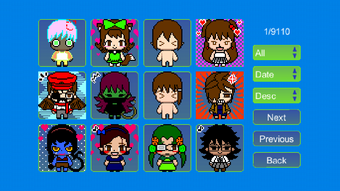
- Community Inspiration – Explore avatars created by other users to discover new ideas, styles, and design techniques.
These features support a range of creative workflows, from casual customization to more involved digital art projects. The app enables users to transform simple ideas into visual expressions, making it a versatile tool for digital identity creation. The ability to save and reuse designs ensures continuity across projects, while the sharing functionality enhances social engagement. The developer did not specify performance details or resource usage, so general behavior patterns are assumed.
User Interface, Workflow & Performance
The user interface of Q Avatar is designed with simplicity and accessibility in mind, featuring a clean layout that organizes avatar parts into intuitive categories. Navigation is straightforward, allowing users to browse, select, and swap components with minimal effort. The workflow follows a logical sequence: choose a base, add facial features, customize accessories, and finalize the design. The app supports touch-based interaction, making it easy to manipulate parts on mobile screens. Users can preview their avatar in real time and adjust elements with immediate visual feedback. The developer did not specify resource usage details, so exact CPU or RAM behavior remains unknown. Performance observations are based on general software behavior patterns for similar Android applications. Stability and responsiveness are expected to be consistent with standard mobile app standards, especially on devices meeting basic Android requirements. The app does not require internet access for core functions, enabling offline creation and editing. However, accessing community content may require connectivity.
Compatibility & System Requirements
Q Avatar is compatible with Android operating systems, as confirmed by the developer. The app has been released in version 1.3.1 and has a file size of 14.8 MB, indicating a lightweight footprint suitable for most Android devices. Installation requires minimal storage space, making it accessible even on lower-end smartphones. The developer did not specify exact system requirements, including minimum Android version, RAM, or processor specifications. Compatibility information was partially provided, and users are advised to ensure their device runs a supported Android version. No additional hardware dependencies were mentioned. For users unsure about compatibility, checking the app’s official page on the Google Play Store is recommended. The app is available for free, with no in-app purchases or subscriptions disclosed.
Pros and Cons
Pros
- Free to download and use with no hidden costs
- Over 3000 customizable parts for highly unique avatar creation
- Supports pixel art, animated GIFs, and comic-style messages
- Easy-to-use interface with intuitive navigation
- Offline functionality for creating and editing avatars
- Community feature for inspiration and sharing
- Multiple export and sharing options via email and social media
Cons
- Exact system requirements were not listed
- Performance details, such as CPU or RAM usage, were not provided
- Community content may require internet access
- Limited customization options for non-pixel art styles
- No mention of cloud sync or backup features
- Availability restricted to Android platform only
FAQ Section
Is Q Avatar available for iOS devices?
Currently, Q Avatar is only available for Android devices. There is no official iOS version released by the developer.
Can I use Q Avatar offline?
Yes, the core features of Q Avatar, including avatar creation, editing, and saving, can be used offline. Internet access is only required to view or upload community content.
Is Q Avatar safe to download and use?
Q Avatar is a free app developed by Pocket-Studio and distributed through official Android channels. As with any app, users should download it from trusted sources like the Google Play Store to ensure security.
Does Q Avatar require in-app purchases?
The app is free to download and use. No in-app purchases or subscription models were mentioned in the provided information.
How often are updates released for Q Avatar?
The latest version available is 1.3.1, released on December 1, 2023. The developer has not disclosed a regular update schedule, but users can expect updates to improve functionality and fix bugs.
Final Thoughts & CTA
Q Avatar stands out as a fun, creative, and accessible tool for Android users who want to craft unique digital identities. With a vast library of customizable parts, support for pixel art and animated content, and seamless sharing options, it delivers strong value for a free application. Its intuitive interface and offline capabilities make it ideal for casual users and creative hobbyists alike. While system requirements and performance data are not detailed, the lightweight size and focus on core functionality suggest broad compatibility. The app is particularly beneficial for those who enjoy personalization, digital art, or social media expression. For anyone seeking a reliable, free avatar maker on Android, Q Avatar offers a compelling solution. Download Q Avatar now to start creating your unique digital avatar today.




.png)


